
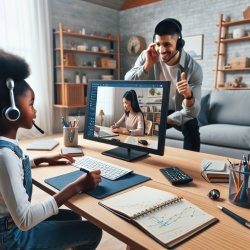
Online Therapy Equipment: What You Need (and What You Don’t)
Online therapy in schools can be a game-changer: students get consistent services, schedules become more flexible, and schools can fill staffing gaps faster. But for teletherapy to feel easy and effective, the technology has to work. The good news is that most schools already have much of what they need.
At TinyEYE, we support schools with online therapy services, and one of the most common questions we hear is: “What equipment do we need?” This guide breaks it down in simple terms—what’s essential, what’s helpful, and how to set students up for success.
The Short List: Core Equipment for Online Therapy
If you want a quick checklist, here are the basics that support most online therapy sessions:
- A reliable computer or tablet
- Stable internet connection
- Camera (built-in or external)
- Microphone and speakers (or a headset)
- A quiet, private space
That’s it. Many “extra” items can improve comfort and sound quality, but they are not always required.
Device Options: Computer vs. Tablet (and Why It Matters)
Online therapy platforms typically work best on a laptop or desktop computer because the screen is larger and it’s easier for students to interact with activities. That said, tablets can work well, especially for younger students or for quick access in classrooms.
Recommended device features
- Updated operating system: Keeps security and compatibility strong.
- Enough processing power: Video calls run smoother when the device isn’t struggling.
- A screen big enough for interaction: Students need to see visuals clearly.
- Keyboard/mouse (if possible): Helpful for older students and many therapy tasks.
What about Chromebooks?
Many schools use Chromebooks successfully for online learning and teletherapy. The key is ensuring the device can run the therapy platform smoothly and that the camera and microphone function well. If your school uses managed devices, it’s also important that the right permissions are enabled for camera/microphone access.
Internet: The Hidden Hero of Successful Sessions
A strong internet connection is often the difference between a calm, productive session and one filled with “Can you hear me?” moments. Online therapy doesn’t require fancy internet, but it does require consistent internet.
Practical internet tips for schools
- Use a stable connection: Wired (Ethernet) is ideal when available.
- Check Wi-Fi strength in the therapy space: Some rooms have weaker signals.
- Limit competing bandwidth: If many devices are streaming video nearby, sessions may lag.
- Have a quick troubleshooting plan: Know who to call if the connection drops.
Audio: Clear Sound Supports Better Therapy
In special education—especially speech-language therapy—sound quality matters. Students need to hear instructions, and clinicians need to hear speech sounds accurately. Even in occupational therapy or counseling sessions, clear audio reduces frustration and helps students stay engaged.
Microphone and speaker options
- Built-in microphone/speakers: Often “good enough,” especially in quiet rooms.
- USB headset with microphone: Typically the best choice for clear audio and privacy.
- Noise-reducing headset: Helpful in busy school environments.
When a headset is strongly recommended
- When the therapy space has background noise (hallways, shared rooms, classrooms)
- When students are easily distracted by surrounding sounds
- When privacy is a concern (counseling, sensitive conversations)
- When articulation and speech sound accuracy are a primary focus
Video: A Camera Helps Clinicians See What Matters
Most laptops and tablets have built-in cameras that work well for teletherapy. Video is important for building connection and for observing communication, attention, and certain motor tasks. For speech and language sessions, seeing facial movements can be helpful. For OT, seeing posture, hand use, and task setup can matter.
Simple camera tips
- Position the camera at eye level: This supports engagement and reduces awkward angles.
- Make sure the student’s face is visible: Avoid sitting with a bright window behind them.
- Check lighting: Soft front lighting helps the clinician see expressions and mouth movements.
The Therapy Space: Quiet, Private, and Predictable
The environment is part of the “equipment,” even though it isn’t plugged in. A calm space helps students regulate, focus, and participate. It also supports confidentiality and reduces interruptions.
What an ideal teletherapy space includes
- Reduced noise: Away from loud hallways, gyms, or cafeterias.
- Visual simplicity: Minimal clutter behind the student.
- Comfortable seating: Feet supported when possible, table at a workable height.
- Privacy: Especially important for counseling or older students.
- Consistent routine: Same room and setup whenever possible.
If space is limited
Many schools get creative. A quiet corner with a divider, a small office, or a scheduled library room can work. The goal is not perfection—it’s reducing barriers so the student can participate comfortably.
Helpful Extras (Not Required, but Nice to Have)
Some add-ons can make sessions smoother, especially for students who need more structure or sensory supports.
- External mouse: Easier for students who struggle with trackpads.
- Touchscreen or stylus: Helpful for writing, drawing, or fine motor tasks.
- Second monitor (for facilitators): Useful for staff managing schedules or supporting multiple students.
- Document camera: Can help show worksheets or hands-on tasks (more common in OT support).
- Basic sensory supports: Fidget tools, a wiggle cushion, or a footrest can help some students stay regulated.
- Visual schedule: A simple printed “First-Then” or session checklist can reduce anxiety.
School Staff Support: The Most Important “Tool”
In many school-based teletherapy models, a facilitator or support staff member helps students log in, stay on task, and transition back to class. This support can be especially important for younger students or those with attention, regulation, or communication needs.
Ways staff can set sessions up for success
- Help the student arrive on time and settle in
- Confirm audio and video are working at the start
- Reduce distractions in the room
- Support behavior expectations and transitions
- Communicate quick updates to the clinician (schedule changes, student concerns)
Accessibility Considerations for Diverse Learners
As a special education-focused provider, we always think about access. Equipment should match student needs—not the other way around.
Examples of simple accessibility supports
- Closed captions: Helpful for some students who benefit from visual language support.
- Volume controls within reach: Students may need to adjust sound quickly.
- Larger screens: Helpful for visual needs and attention.
- Alternative input: Switch access, adapted mouse, or keyboard supports when needed.
- Break supports: A timer or visual break card for students who fatigue quickly on screens.
A Quick Pre-Session Checklist
Here’s a simple routine that prevents most tech issues:
- Device charged (or plugged in)
- Internet connected and stable
- Camera on and positioned well
- Microphone working (quick test)
- Headset available if needed
- Student has materials requested (if any)
- Room is quiet and ready
Final Thoughts: Keep It Simple and Student-Centered
Online therapy doesn’t require a complicated setup. When schools focus on a reliable device, clear audio, stable internet, and a calm space, students can spend their energy on learning—not troubleshooting. The best equipment is the equipment that works consistently, fits the student, and supports a predictable routine.
For more information, please follow this link.